Stable Diffusionで画像生成している時に、他の画像のメタデータ(プロンプト)を参考にしたいことがあると思います。画像をドロップすればメタデータが表示されるウェブページの作り方を載せておきます。コードをコピペするだけです。
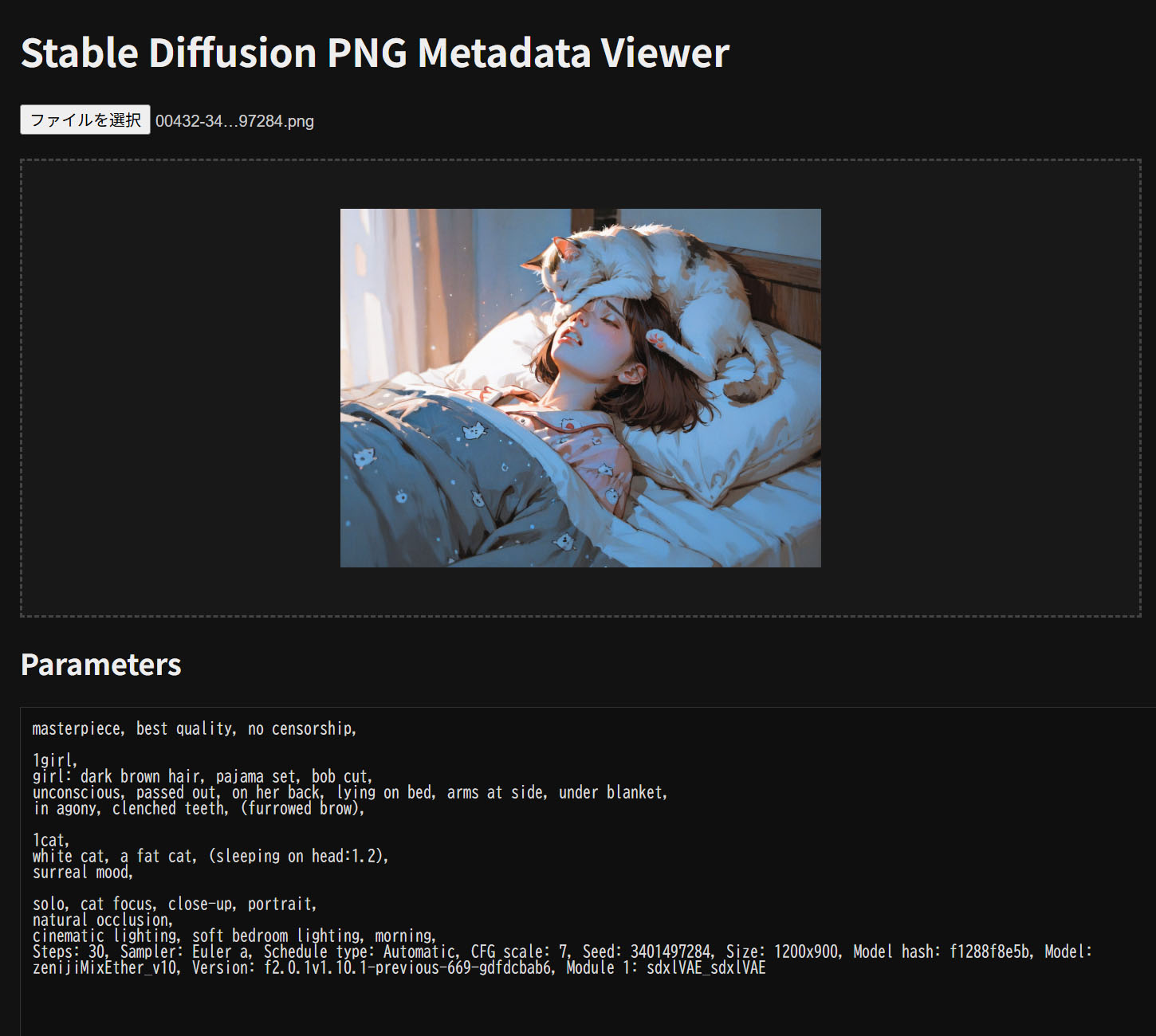
ウェブブラウザでHTMLファイルを開き、画像表示部分に画像をドロップすれば読み込まれます。
コード
sd-metadata-viewer.htmlのようなファイルをつくり、中身は以下のコードを貼り付けてください。あとはウェブブラウザで開くだけです。
<!DOCTYPE html>
<html lang="ja">
<head>
<meta charset="UTF-8" />
<title>Stable Diffusion PNG Info</title>
<style>
/* ===== Dark Theme ===== */

body {
  font-family: sans-serif;
  margin: 20px;
  background: #121212;
  color: #ddd;
}

h1, h2 {
  color: #eee;
}

#fileInput {
  margin-bottom: 20px;
  color: #ccc;
}

#dropzone {
  padding: 40px;
  border: 2px dashed #444;
  text-align: center;
  color: #888;
  margin-bottom: 20px;
  transition: 0.2s;
  cursor: pointer;
  background: #181818;
}

#dropzone.dragover {
  border-color: #3daee9;
  color: #3daee9;
  background: #1c1c1c;
}

#dropzone img {
  max-width: 100%;
  max-height: 300px;
  display: block;
  margin: 0 auto;
  cursor: pointer;
}

/* textarea */
textarea {
  width: 100%;
  height: 480px;
  background: #0f0f0f;
  color: #ddd;
  border: 1px solid #333;
  padding: 10px;
  font-family: monospace;
}

/* modal */
#modal {
  display: none;
  position: fixed;
  inset: 0;
  background: rgba(0,0,0,0.85);
  justify-content: center;
  align-items: center;
  z-index: 1000;
}

#modal img {
  max-width: 95vw;
  max-height: 95vh;
  box-shadow: 0 0 40px rgba(0,0,0,0.8);
}

/* scrollbar (optional) */
textarea::-webkit-scrollbar {
  width: 8px;
}
textarea::-webkit-scrollbar-thumb {
  background: #333;
}
textarea::-webkit-scrollbar-track {
  background: #111;
}
</style>
</head>
<body>

<h1>Stable Diffusion PNG Metadata Viewer</h1>

<input id="fileInput" type="file" accept="image/png" />

<div id="dropzone">
  PNG をここにドラッグ&ドロップ
</div>

<h2>Parameters</h2>
<textarea id="output" readonly></textarea>

<!-- modal -->
<div id="modal">
  <img id="modalImage" />
</div>

<script>
const fileInput = document.getElementById("fileInput");
const dropzone = document.getElementById("dropzone");
const output = document.getElementById("output");
const modal = document.getElementById("modal");
const modalImage = document.getElementById("modalImage");

let currentImageURL = null;

async function loadPNG(file) {
  if (!file || file.type !== "image/png") {
    output.value = "PNGファイルを選択してください";
    resetDropzone();
    return;
  }

  showThumbnailInDropzone(file);

  const buffer = await file.arrayBuffer();
  const text = extractParameters(buffer);

  output.value = text || "parameters が見つかりませんでした";
}

function showThumbnailInDropzone(file) {
  if (currentImageURL) {
    URL.revokeObjectURL(currentImageURL);
  }

  currentImageURL = URL.createObjectURL(file);
  dropzone.innerHTML = `<img src="${currentImageURL}" />`;

  dropzone.querySelector("img").addEventListener("click", () => {
    modalImage.src = currentImageURL;
    modal.style.display = "flex";
  });
}

function resetDropzone() {
  dropzone.innerHTML = "PNG をここにドラッグ&ドロップ";
}

modal.addEventListener("click", () => {
  modal.style.display = "none";
});

document.addEventListener("keydown", (e) => {
  if (e.key === "Escape") {
    modal.style.display = "none";
  }
});

fileInput.addEventListener("change", (e) => {
  loadPNG(e.target.files[0]);
});

dropzone.addEventListener("dragover", (e) => {
  e.preventDefault();
  dropzone.classList.add("dragover");
});

dropzone.addEventListener("dragleave", () => {
  dropzone.classList.remove("dragover");
});

dropzone.addEventListener("drop", (e) => {
  e.preventDefault();
  dropzone.classList.remove("dragover");

  const file = e.dataTransfer.files[0];
  loadPNG(file);
});

function extractParameters(buffer) {
  const bytes = new Uint8Array(buffer);
  let offset = 8;

  while (offset < bytes.length) {
    const length =
      (bytes[offset] << 24) |
      (bytes[offset + 1] << 16) |
      (bytes[offset + 2] << 8) |
      bytes[offset + 3];

    const type = String.fromCharCode(
      bytes[offset + 4],
      bytes[offset + 5],
      bytes[offset + 6],
      bytes[offset + 7]
    );

    if (type === "tEXt" || type === "iTXt") {
      const dataStart = offset + 8;
      const dataEnd = dataStart + length;
      const chunkData = bytes.slice(dataStart, dataEnd);
      const text = new TextDecoder().decode(chunkData);

      if (text.startsWith("parameters")) {
        return text
          .replace("parameters", "")
          .replace(/^\0+/, "");
      }
    }

    offset += 12 + length;
  }

  return null;
}
</script>

</body>
</html>
※ChatGPTに書いてもらいました。コードも人が書かない時代になっていくんでしょうかねえ。